Friday, March 21, 2014
Flash Giveaway!
One of my first blog posts ever was Do You Want Cheap Books for your Classroom? and if you havent read it yet, you should definitely go check it out now! In the past Ive gotten 300 books for $10.
I went to one of these fabulous book sales yesterday and picked up all of these books for $25!

Now... for the flash giveaway! Can you guess how many books I got for 25? Whoever is closest to the actual number of books wins... and theyll win my complete library organization set, pictured below!


Leave an answer with your estimate! This contest will end tomorrow, July 19 at 6:00PM EST
Read More..
I went to one of these fabulous book sales yesterday and picked up all of these books for $25!
Now... for the flash giveaway! Can you guess how many books I got for 25? Whoever is closest to the actual number of books wins... and theyll win my complete library organization set, pictured below!
Leave an answer with your estimate! This contest will end tomorrow, July 19 at 6:00PM EST

Technology Tuesday Postponed!
Hey everyone! Im so sorry but I have to postpone my "Technology Tuesday" post again. I always forget how much work goes into setting up the classroom and the first week of Kindergarten! I will definitely do the post next week!
Read More..
Great Shopping Deals Year Round Not Just Black Friday!
So I know this deal has absolutely nothing to do with teaching... but hey, teachers deserve to get some great shopping deals, right? And, since today is Black Friday, Im sure this is the exactly whats on everyones mind! (Well, its on my mind at least!)
Obviously everyone knows about Amazon, but do you know that you can easily find the price history of any item on Amazon to tell if youre getting a good deal or not?!

First things first, head to Amazon, and pull up an item that you are interested in. I pulled up Avery 5160 Labels... my favorite! :)
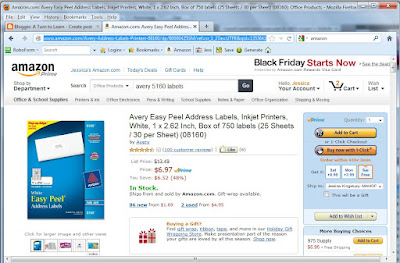
Copy the link from your address bar (e.g.: http://www.amazon.com/Avery-Address-Labels-Printers-08160/dp/B00004Z5SM/ref=sr_1_2?ie=UTF8&qid=1353641122&sr=8-2&keywords=avery+5160+labels ). You can copy the link by choosing Edit > Copy, or by doing Control + C on a PC, or Command + C on a Mac.
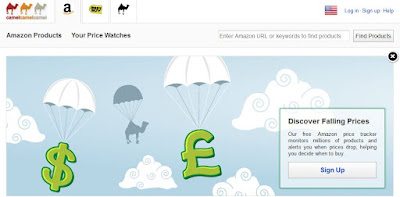
Next, visit the website http://camelcamelcamel.com . You can head there by clicking the picture below!

In the top right hand corner, there is a box that says "Enter Amazon URL or keywords to find products." Click in that box and paste in the web address that you just copied. You can paste the link by choosing Edit > Paste, or by doing Control + V on a PC, or Command + V on a Mac.
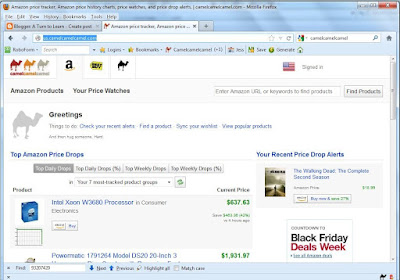
Click "Find Products" next to where you pasted the link. If you scroll down a little bit, youll see a chart that shows the items price history.
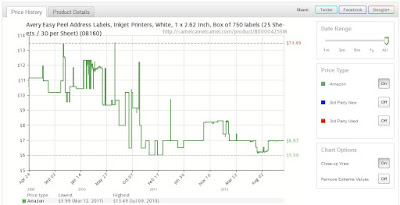
If you keep scrolling, youll find a list of the dates when the item was highest priced and lowest priced, as well as the last 5 price changes.
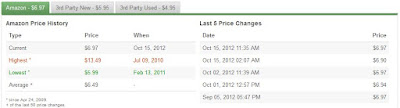
So... if youre looking to find out if youre getting a good deal on the item you can easily tell! Right now these labels are pretty reasonably priced... perhaps I need to stock up.
But, wait... I havent even told you the best part yet! If you create a free account for the website, you can get email alerts when the item drops below a certain price!
Head back to the main website, http://camelcamelcamel.com/ . Click "Sign Up" (in the top right hand corner, or towards the middle right of the screen.)
Paste back in your item link. In that big maroon box, it says "Create Amazon price watches for: ...your item..." Right below that, there is a green box that says "Amazon." In the desired price box, enter your desired price.
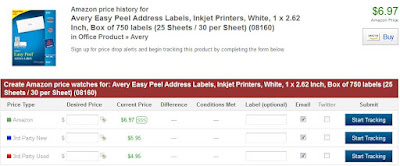
When your item drops below that price, CamelCamelCamel will send you an email alerting you of the new price. (For those of you worried about junk mail... Ive used this option for a few months and I havent noticed any additional spam from it!)
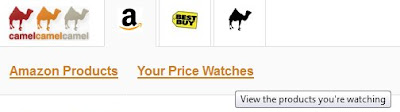
If you want to check which items you are tracking, you can always click "Your Price Watches" at the top of the page.
 I entered in all of the Christmas gifts that I want to get people and set up to be alerting when the item drops within a dollar of its lowest documented price. Ive already gotten alerts for two of the items... and for my
printer ink! I am absolutely loving it!
Id love to hear about what items youre loving from Amazon that youre going to enter into the price tracker... and Id love to hear about any Black Friday excursions you went on!!!!
Read More..
Obviously everyone knows about Amazon, but do you know that you can easily find the price history of any item on Amazon to tell if youre getting a good deal or not?!
First things first, head to Amazon, and pull up an item that you are interested in. I pulled up Avery 5160 Labels... my favorite! :)
Copy the link from your address bar (e.g.: http://www.amazon.com/Avery-Address-Labels-Printers-08160/dp/B00004Z5SM/ref=sr_1_2?ie=UTF8&qid=1353641122&sr=8-2&keywords=avery+5160+labels ). You can copy the link by choosing Edit > Copy, or by doing Control + C on a PC, or Command + C on a Mac.
In the top right hand corner, there is a box that says "Enter Amazon URL or keywords to find products." Click in that box and paste in the web address that you just copied. You can paste the link by choosing Edit > Paste, or by doing Control + V on a PC, or Command + V on a Mac.
Click "Find Products" next to where you pasted the link. If you scroll down a little bit, youll see a chart that shows the items price history.
If you keep scrolling, youll find a list of the dates when the item was highest priced and lowest priced, as well as the last 5 price changes.
So... if youre looking to find out if youre getting a good deal on the item you can easily tell! Right now these labels are pretty reasonably priced... perhaps I need to stock up.
But, wait... I havent even told you the best part yet! If you create a free account for the website, you can get email alerts when the item drops below a certain price!
Head back to the main website, http://camelcamelcamel.com/ . Click "Sign Up" (in the top right hand corner, or towards the middle right of the screen.)
Paste back in your item link. In that big maroon box, it says "Create Amazon price watches for: ...your item..." Right below that, there is a green box that says "Amazon." In the desired price box, enter your desired price.
When your item drops below that price, CamelCamelCamel will send you an email alerting you of the new price. (For those of you worried about junk mail... Ive used this option for a few months and I havent noticed any additional spam from it!)
If you want to check which items you are tracking, you can always click "Your Price Watches" at the top of the page.
printer ink! I am absolutely loving it!
Id love to hear about what items youre loving from Amazon that youre going to enter into the price tracker... and Id love to hear about any Black Friday excursions you went on!!!!
Thursday, March 20, 2014
Get Your Kids To Write Their Name on Their Work!
Im starting to go through my plans for the beginning of the year and I found a bunch of things that I want to add to my blog... and many of them Ill be adding as freebies! Soo... heres the first freebie!
Years ago I learned the first verse of this song from a preschool teacher at my previous job. So, my first year teaching Kindergarten, I obviously used it a LOT with my kiddos.
I was absolutely amazed when my students added new verses to the song! Thats right... my students wrote the second and third verses of this song! I absolutely love how creative they were and I use all three verses with my students nowadays!
I added this file to TPT as a PowerPoint file so you can insert your own name into it, and I even embedded the font into the document so it should load up on your computer perfectly. I havent actually done the embedding before so I hope it works!
Click the picture below to download the song!

How do you get your kiddos to remember to write their names on their paper?
Read More..
Years ago I learned the first verse of this song from a preschool teacher at my previous job. So, my first year teaching Kindergarten, I obviously used it a LOT with my kiddos.
I was absolutely amazed when my students added new verses to the song! Thats right... my students wrote the second and third verses of this song! I absolutely love how creative they were and I use all three verses with my students nowadays!
I added this file to TPT as a PowerPoint file so you can insert your own name into it, and I even embedded the font into the document so it should load up on your computer perfectly. I havent actually done the embedding before so I hope it works!
Click the picture below to download the song!
How do you get your kiddos to remember to write their names on their paper?
How to Get Rid of the White Border on Your PDF!
I know its not Tuesday, but heres a special Technology Wednesday post! A few people commented about that annoying white border that pops up with you "print" a PDF of your PowerPoint. Heres how to get rid of it!



Read More..
You can download this tutorial as a PDF by clicking this picture!
Note: This tutorial is hosted on Google Docs. To save it from there, just open the file and click File > Download to save onto your computer!
Winners!
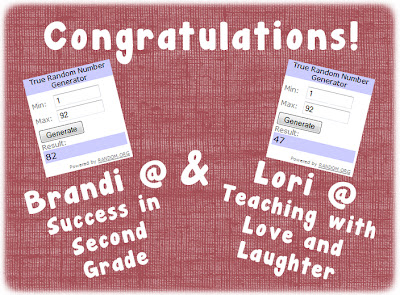
The winners for my 300 follower giveaway are Brandi at Success in Second Grade and Lori at Teaching with Love and Laughter! Lori is one luck lady... shes actually won two of my giveaways in a row! AND... she just reached 500 followers so shes having a giveaway of her own right now! Congrats Lori! And both Bradi and Lori have awesome blogs, so you should check them both out!
Thank you everyone else for entering. Lori and Brandi, Ill send your items right now! Congratulations again!
Read More..
Thank you everyone else for entering. Lori and Brandi, Ill send your items right now! Congratulations again!
Wednesday, March 19, 2014
How to Recolor an Image in PowerPoint
This weeks poll had a clear cut winner... how to recolor an image in PowerPoint!

I actually wrote this tutorial months ago (back in March 2013, yikes!) for my TPT book "How to Make a Cute Cover Page for Teachers Pay Teachers." This item organizes some of my most important tutorials in a way that is easy to follow and prints perfectly on letter paper. If you like this tutorial or my other tutorials, be sure to check out this product on TPT!

Anyway, onto the poll!


For next weeks tutorial, Ill be adding "How to Create a One Page Folding Book" to the poll (just like the one below). Be sure to vote!


Read More..
I actually wrote this tutorial months ago (back in March 2013, yikes!) for my TPT book "How to Make a Cute Cover Page for Teachers Pay Teachers." This item organizes some of my most important tutorials in a way that is easy to follow and prints perfectly on letter paper. If you like this tutorial or my other tutorials, be sure to check out this product on TPT!
Anyway, onto the poll!
If you have an older version of PowerPoint or are looking for more color customization options, be sure to check out the tutorial below:
You can download this tutorial as a PDF by clicking this picture!
Note: This tutorial is hosted on Google Drive. To save it from there, just open the file and click File > Download to save onto your computer!
For next weeks tutorial, Ill be adding "How to Create a One Page Folding Book" to the poll (just like the one below). Be sure to vote!
Subscribe to:
Posts (Atom)