Showing posts with label with. Show all posts
Showing posts with label with. Show all posts
Friday, March 7, 2014
Back to School with No David!
My students always LOVE reading all of the No, David books by David Shannon, and I came up with a really fun activity for them to go along with the books... a puppet! Its the perfect activity to introduce classroom management at the beginning of the school year!

I included 10 different writing options... perfect for all of the elementary grades:
There are also additional writing pages available for each of the levels so that your students can attach multiple pages on their puppet!
It also has two options in terms of the thickness of lines... As far as the line thickness, I like to use thicker lines with my Kindergarten students so that they can color in the lines easier, and in the past I’ve used thinner lines with older students so that they don’t assume you’re giving them a “baby” coloring page!
Check it out at TPT by clicking the picture above! Its $4, but theres a big sale coming up at TPT, so you can get it at a discount very soon! Click the picture below to see my store!

Read More..
I included 10 different writing options... perfect for all of the elementary grades:
- David’s Body – without any text
- David’s Body – with Name/Date on arms and room for an illustration
- David’s Body – with large primary writing lines and room for a picture
- David’s Body – with medium primary writing lines and room for a picture
- David’s Body – with small primary writing lines and room for a picture
- David’s Body – with writing lines and room for a picture
- David’s Body – with large primary writing lines, no room for a picture
- David’s Body – with medium primary writing lines, no room for a picture
- David’s Body – with small primary writing lines, no room for a picture
- David’s Body – with writing lines, no room for a picture
There are also additional writing pages available for each of the levels so that your students can attach multiple pages on their puppet!
It also has two options in terms of the thickness of lines... As far as the line thickness, I like to use thicker lines with my Kindergarten students so that they can color in the lines easier, and in the past I’ve used thinner lines with older students so that they don’t assume you’re giving them a “baby” coloring page!
Check it out at TPT by clicking the picture above! Its $4, but theres a big sale coming up at TPT, so you can get it at a discount very soon! Click the picture below to see my store!
Fellow bloggers: feel free to use this picture to promote your own sale! If you dont mind, link back to my blog to let people know where you got the image!

Sunday, October 13, 2013
What’s Wrong With Apple’s iOS 5 0 1 more power
What’s Wrong With Apple’s iOS 5.0.1 Update?
When Apple dropped iOS 5.0.1 to fix the battery issue, yesterday, most of you updated to iOS 5.0.1 to fix the battery issue but the update hasn’t helped.

There are 275 pages from unhappy customers on this issue, here are just a few comments:
Jailbreakers who didn’t update to iOS 5.0.1, stay away if you want untethered jailbreak for iOS 5.
When Apple dropped iOS 5.0.1 to fix the battery issue, yesterday, most of you updated to iOS 5.0.1 to fix the battery issue but the update hasn’t helped.
There are 275 pages from unhappy customers on this issue, here are just a few comments:
Quote:
| “Installed the new IOS 5.0.1 two hours ago. I started a test at 1:30 CT today. 5% battery drain in 45 minutes with WIFI and location services turned on and me not touching the Iphone 4S. The new update doesn’t seem to help much.” |
Quote:
| “Lost 15% in 45 mins and I didn’t even use the phone. What happened? This update is no help. In fact, it drains the battery even quicker.” |
Quote:
| “Upgraded to 5.0.1 this morning. Still draining at the exact same rate. Unplugged with a full charge 2 1/2 hours ago, and already down to 80% with light usage.” |
Quote:
| “I updated last night (UK) and it didn’t fix anything. Losing 6% / hr in standby which is the same as with 5.0.” |
Quote:
| “Updated to 5.0.1 last night and my battery life seems even worse than before! My phone dropped by 4% overnight in flight mode! I have had it out of flight mode since 6.30am (at which time the battery was at 51%), and its now 8.30am and its down to 35%.” |
Wednesday, October 9, 2013
Apple TV 2G Update Released With Support For Purchasing TV Episodes
It seems like earlier today, Apple has quietly pushed out an Apple TV 2G update that now brings support for purchasing TV episodes via the Apple TV itself.


John Gruber from Daring Fireball explains:
I just ran software update on my Apple TV 2 and got a new update that adds support for a major new feature: purchased TV shows. You can buy - not just rent but buy - new episodes directly from your Apple TV, and access and stream any TV show episodes youve previously purchased using your iTunes account.
Previously, it was not possible for you to purchase TV episodes via the Apple TV 2G. Not only this, the update also adds support for Vimeo video content and the YouTube playlist feature. Apart from this, Apple has also added Purchased tab under the TV section in iTunes for both Windows and Mac allowing you to free re-download content that you have already paid for.
This brings the Apple TV 2G iOS version up to iOS 4.3 with a build number of 8F455. Initial reports are suggesting that this Purchased feature is currently available in the U.S. as of now. Earlier today, we also reported that Apple may release 3 HDTVs by March 2012.
This brings the Apple TV 2G iOS version up to iOS 4.3 with a build number of 8F455. Initial reports are suggesting that this Purchased feature is currently available in the U.S. as of now. Earlier today, we also reported that Apple may release 3 HDTVs by March 2012.
Below you can find the direct links to the AppleTV Firmware Files for every released firmware version.
1.0.0: OS-dot-DMG 1.0.dmg
1.1.0: 2Z694-5248-45.dmg
2.0.0: 2Z694-5274-109.dmg
2.0.1: 2Z694-5387-25.dmg
2.0.2: 2Z694-5428-3.dmg
2.1.0: 2Z694-5485-1.dmg
2.2.0: 2Z694-5499.dmg
2:3:0: 2Z694-5573-24.dmg
2.3.1: 2Z694-5587-18.dmg
2.4.0: 2Z694-5660-029.dmg
3.0.0: 2Z694-5789-067.dmg
3.0.1: 2Z694-6004-003.dmg
3.0.2: 2Z694-6013-013.dmg
4.1.0: AppleTV2,1_4.1_8M89_Restore.ipsw
4.2.0: AppleTV2,1_4.2_8C150_Restore.ipsw
4.2.1: AppleTV2,1_4.2.1_8C154_Restore.ipsw
4.3.0: AppleTV2,1_4.3_8F191m_Restore.ipsw
4.3.0 (Build 8F202): AppleTV2,1_4.3_8F202_Restore.ipsw
4.3.0 (Build 8F305): AppleTV2,1_4.3_8F305_Restore.ipsw
4.3.0 (Build 8F455): AppleTV2,1_4.3_8F455_Restore.ipsw
Bonus:
MacOS X 10.4.9 Combo Updater
1.0.0: OS-dot-DMG 1.0.dmg
1.1.0: 2Z694-5248-45.dmg
2.0.0: 2Z694-5274-109.dmg
2.0.1: 2Z694-5387-25.dmg
2.0.2: 2Z694-5428-3.dmg
2.1.0: 2Z694-5485-1.dmg
2.2.0: 2Z694-5499.dmg
2:3:0: 2Z694-5573-24.dmg
2.3.1: 2Z694-5587-18.dmg
2.4.0: 2Z694-5660-029.dmg
3.0.0: 2Z694-5789-067.dmg
3.0.1: 2Z694-6004-003.dmg
3.0.2: 2Z694-6013-013.dmg
4.1.0: AppleTV2,1_4.1_8M89_Restore.ipsw
4.2.0: AppleTV2,1_4.2_8C150_Restore.ipsw
4.2.1: AppleTV2,1_4.2.1_8C154_Restore.ipsw
4.3.0: AppleTV2,1_4.3_8F191m_Restore.ipsw
4.3.0 (Build 8F202): AppleTV2,1_4.3_8F202_Restore.ipsw
4.3.0 (Build 8F305): AppleTV2,1_4.3_8F305_Restore.ipsw
4.3.0 (Build 8F455): AppleTV2,1_4.3_8F455_Restore.ipsw
Bonus:
MacOS X 10.4.9 Combo Updater
Tuesday, October 1, 2013
How Do I Know If My PC Is Infected With Spyware or Adware
How Do I Know If My PC Is Infected With Spyware or Adware - Many individuals that are new to the Internet world are anxious about the potential of germs, Viruses or Viruses that can damage their pc, impact efficiency or make their very individual details public to others.
Spyware applications can do a number of harmful factors to your laptop or pc. Viruses infects your pc and conceals in the background and can do many unpleasant factors to the efficiency of your program. It can also do dangerous factors to you such as send out your individual details, your every key stroke and photo that is located on your disk drive, observe your browsing routines and shopping routines and irritate you with frustrating pop-ups loaded with advertising and even porn.
If you are suffering from any uncommon changes in your pcs efficiency or have any uncommon new pop-ups, changes to your tool bars or new symbols on your desktop computer, you should run a program check out to find out if you have Viruses. Products exist on the market to help you battle this issue. Be sure to set up application that you know is reputable. Installing free software can often result in further Viruses current on your pc. Viruses, Viruses and Viruses companies frequently deceive customers into submitting pop-ups informing them that theres a issue with their pc and this in fact is further spyware. These mistakes can open your program up to future further problems by sleeping individuals into thinking theyre downloading repairs when really further spyware is being downloadable.
Watch your body efficiency and at the sign of any uncommon activity, realize that you are probably contaminated. Do something as soon as possible to secure your comfort. These applications dont differentiate and can release themselves when you or your close relatives sit in front of the pc. Adult pop-ups can turn up whether its an adult or a child using the pc. Protect your pc.
Antivirus alone isnt enough to battle this issue. Viruses sneaks into your program via exe information that you dont need to do anything to release. They can put up as accessories that you obtain or by many other means. Theyre dangerous and frustrating but you can secure your pc and your comfort with the right application. This application needs to have an auto upgrade for spyware descriptions as new spyware descriptions are being added daily. So a spyware treatment program is a great enhance to your current anti-virus application.
Total Enhancements, Inc. focuses on creating top rated applications designed to fix individuals needs. The spyware treatment application, http://www.emailspy.com & http://www.folderhider.com are a few of the most recent. See more details at: http://www.spyblaster.com
Article Source: http://EzineArticles.com/?expert=Buzz_Scott
Spyware applications can do a number of harmful factors to your laptop or pc. Viruses infects your pc and conceals in the background and can do many unpleasant factors to the efficiency of your program. It can also do dangerous factors to you such as send out your individual details, your every key stroke and photo that is located on your disk drive, observe your browsing routines and shopping routines and irritate you with frustrating pop-ups loaded with advertising and even porn.
If you are suffering from any uncommon changes in your pcs efficiency or have any uncommon new pop-ups, changes to your tool bars or new symbols on your desktop computer, you should run a program check out to find out if you have Viruses. Products exist on the market to help you battle this issue. Be sure to set up application that you know is reputable. Installing free software can often result in further Viruses current on your pc. Viruses, Viruses and Viruses companies frequently deceive customers into submitting pop-ups informing them that theres a issue with their pc and this in fact is further spyware. These mistakes can open your program up to future further problems by sleeping individuals into thinking theyre downloading repairs when really further spyware is being downloadable.
Watch your body efficiency and at the sign of any uncommon activity, realize that you are probably contaminated. Do something as soon as possible to secure your comfort. These applications dont differentiate and can release themselves when you or your close relatives sit in front of the pc. Adult pop-ups can turn up whether its an adult or a child using the pc. Protect your pc.
Antivirus alone isnt enough to battle this issue. Viruses sneaks into your program via exe information that you dont need to do anything to release. They can put up as accessories that you obtain or by many other means. Theyre dangerous and frustrating but you can secure your pc and your comfort with the right application. This application needs to have an auto upgrade for spyware descriptions as new spyware descriptions are being added daily. So a spyware treatment program is a great enhance to your current anti-virus application.
Total Enhancements, Inc. focuses on creating top rated applications designed to fix individuals needs. The spyware treatment application, http://www.emailspy.com & http://www.folderhider.com are a few of the most recent. See more details at: http://www.spyblaster.com
Article Source: http://EzineArticles.com/?expert=Buzz_Scott
Monday, September 30, 2013
Jailbreak iOS 5b5 on iPhone iPod touch iPad with Redsn0w 0 9 8b5
The Dev-Team has already upgraded its Redsn0w 0.9.8b5 to jailbreak iOS 5 beta 5.
As for the previous iOS 5, the jailbreak is possible but it’s tethered, meaning that you have to plugin your iOS device to the computer and boot it in
tethered mode using Redn0w
.
Please note that you’ll not be able to unlock your iPhone using this method. An unlock for iOS 5 is still not possible.
This jailbreak does not work for iPad 2. If you have an iPad 2 jailbroken with JailbreakMe 3.0, stick to it because an untethered jailbreak for iPad 2 will not be available for a while.
This jailbreak will work on iPhone 3GS, iPhone 4, iPod touch (third and fourth generation) and iPad 1.
Download Redsn0w 0.9.8b5 for Mac
Download Redsn0w 0.9.8b5 for Win


Friday, September 20, 2013
How to Enter DFU Mode With a Broken Home or Power Button
These are instructions on how to put your iPhone, iPad, or iPod touch into DFU mode with a broken home or power button.
Step One
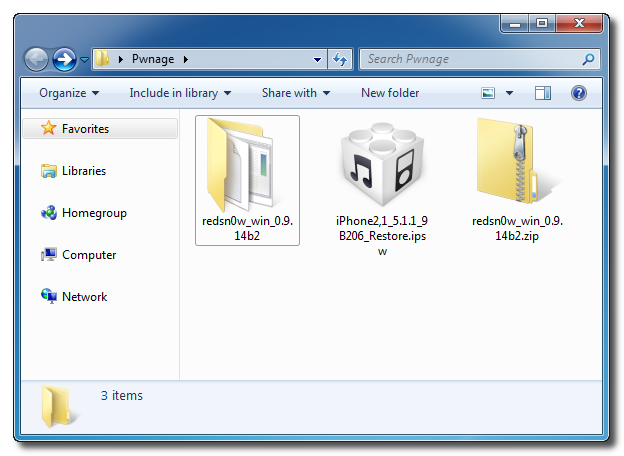
Create a new folder on your desktop called Pwnage.
In the folder place the most recent firmware (which can be downloaded from here: iPhone, iPad, iPod Touch) and the latest version of RedSn0w (from here).
Extract the RedSn0w zip file to the Pwnage folder.
Step Two
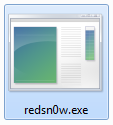
Launch the redsn0w application from the redsn0w folder we extracted earlier. You can do this by right clicking the executable and selecting Run as Administrator contextual menu.
Step Three
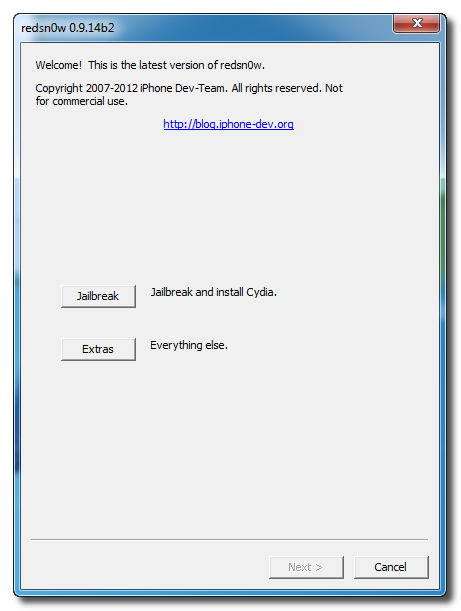
Once RedSn0w opens click the Extras button.
Step Four
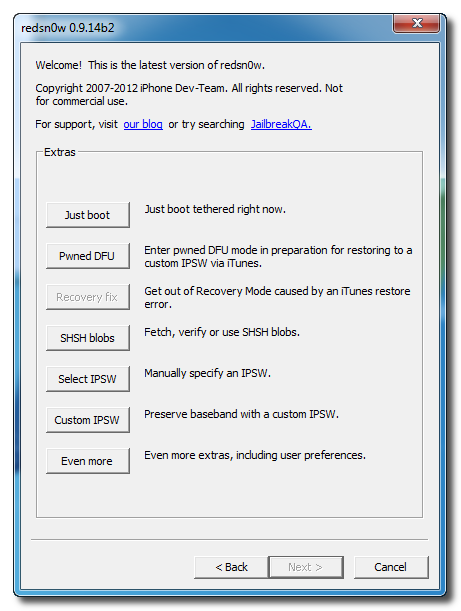
Choose Even More from the Extras menu.
Step Five
Select DFU IPSW from the Even More menu.
Step Six
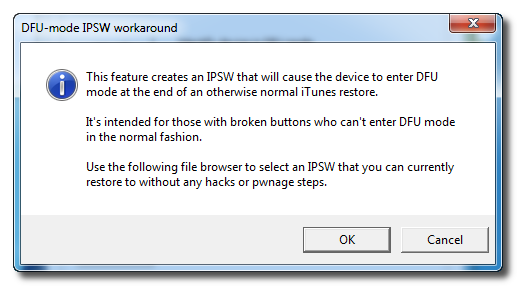
You will be instructed to select an IPSW that you can currently restore to without any hacks or pwnage steps. Click OK.
Step Seven
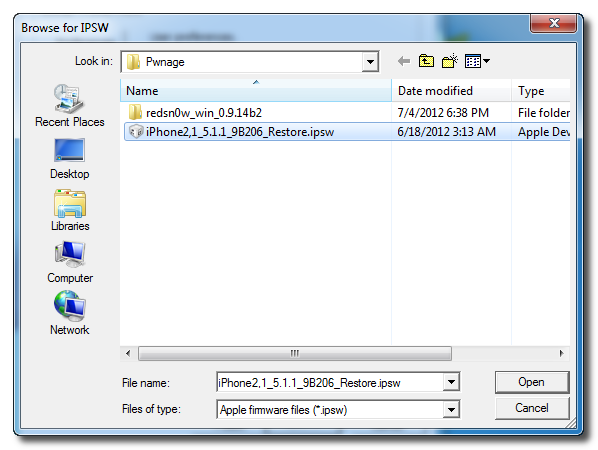
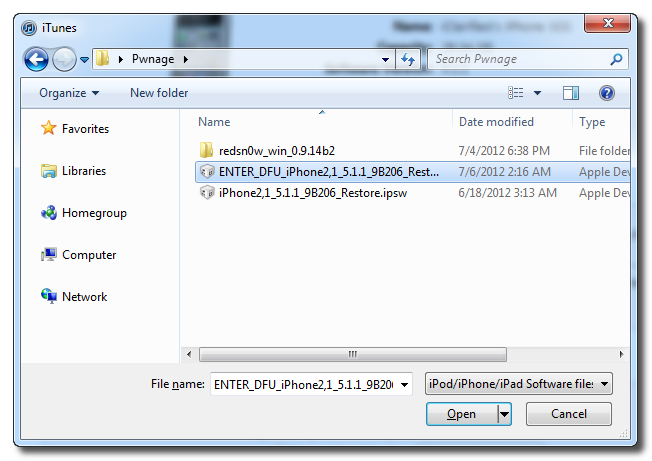
Select the ipsw firmware file you downloaded in Step One and click Open.
Step Eight
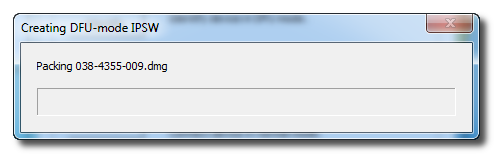
RedSn0w will now proceed to create a DFU Mode IPSW.
Step Nine
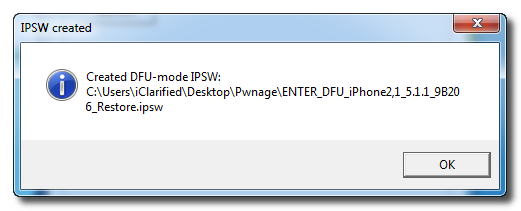
You will be notified once the IPSW has been created successfully. Click the OK button.
Step Ten
Launch iTunes.
Step Ten
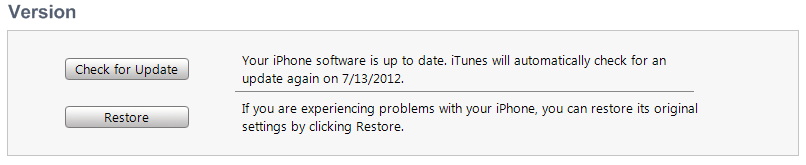
Connect your device to the computer and select it from list of devices on the left. If you havent performed a backup recently, perform one now. Next, make sure you are on the Summary then hold down the Shift key and click Restore.
Step Eleven
Select the ENTER_DFU ipsw from the Pwnage folder on your desktop and click the Open button.
Step Twelve
After your device has been restored it will be dumped into DFU mode. The screen will remain black and you may be able to jailbreak depending on the firmware youve restored to.



Finding Your iPhone’s Unique Identifier UDID with or without iTune
Apple has given developers a way to beta test iPhone applications with up-to 100 iPhones. Some developers have already started using this to their advantage by giving their software out as free public betas. However, you must supply a developer with your iPhones UDID (unique device identifier) in order to install these "Ad-hoc" applications on your iPhone.
Each iPhone or iPod Touch has a Unique Device Identifier (UDID), which is a sequence of 40 letters and numbers that is specific to your device. It’s like a serial number but much harder to guess. It will look something like this: 2b6f0cc904d137be2e1730235f5664094b831186.
Options
A. System profiler.... USB.....iPhone.....use the serial number
B. Install SDK 3.0, then start up xCode, select the phone on the left pane and it will give you the UDID.
C. with pc goto system information under settings, the goto components, then usb, the you will see the iphone connected that is the 40 digit hex number
D. iphone backup is named "{UDID} - {date}"...store on PC at C:UsersUSERAppDataRoamingApple COmputerMobileSyncBackup
E. Go to http://www.apple.com/support/iphone/enterprise/
Install Apples "iPhone Configuration Utility" (Windows or MAC) and it will display the UDID and allow you to export that data to a text file for easy copy & paste into your Apple Dev Portal.
Good luck!
Read More..
Each iPhone or iPod Touch has a Unique Device Identifier (UDID), which is a sequence of 40 letters and numbers that is specific to your device. It’s like a serial number but much harder to guess. It will look something like this: 2b6f0cc904d137be2e1730235f5664094b831186.
Why do we need the UDID?
Your iPhone can only install programs that are approved by Apple. Applications in the App Store have been approved by Apple for general distribution, but beta customers get to try the app before it’s in the store. We register your UDID with Apple so they can approve our application especially for your iPhone.How do I get my UDID?
You can copy/paste your UDID from iTunes or email it directly from your device by using a free app from the App Store.Email Using the Free App
Install and run Ad Hoc Helper. It will create an email with your UDID. Send it to nobody@example.com.Copy/Paste from iTunes
- Launch iTunes and connect your iPhone.
- In the right pane, locate the information about your iPhone, including its name, capacity, software version, serial number, and phone number.
- Reveal the Identifier by clicking on Serial Number:.
- Copy the Identifier to your clipboard by choosing Edit → Copy.
- Paste the Identifier into an email to nobody@example.com (You should be able to paste into your mail program or web browser by selecting Edit → Paste).


Options
A. System profiler.... USB.....iPhone.....use the serial number
B. Install SDK 3.0, then start up xCode, select the phone on the left pane and it will give you the UDID.
C. with pc goto system information under settings, the goto components, then usb, the you will see the iphone connected that is the 40 digit hex number
D. iphone backup is named "{UDID} - {date}"...store on PC at C:UsersUSERAppDataRoamingApple COmputerMobileSyncBackup
E. Go to http://www.apple.com/support/iphone/enterprise/
Install Apples "iPhone Configuration Utility" (Windows or MAC) and it will display the UDID and allow you to export that data to a text file for easy copy & paste into your Apple Dev Portal.
Good luck!
Thursday, September 19, 2013
Bad Piggies Free no Bull Sh t with Patch Enjoy for Windows ISO and Android
P2P group THETA with a great release, they brought us the new game made by Rovio – creators of the Angry Birds franchise. Here’s the already popular and brand new Bad Piggies for PC. Played it on my Android phone and honestly it’s quite funny to play, only got passed the first few levels yet though. Enjoy guys!


Download is URLs:
http://unblockedpiratebay.com/?loadurl=/torrent/7679853/Bad_Piggies_HD_%28PC%29___Patch
http://www.4shared.com/rar/V2BTO2cm/BadPiggiesv100cracked-THETA.html
Download: NETLOAD | UPLOADED | SHARPFiLE | UMB
More
http://freakshare.com/files/1m8nvioa...THETA.rar.html
—
http://rapidgator.net/file/46582243/...THETA.rar.html
—
http://www.restfile.net/gbfizd8hqghn...THETA.rar.html
—
http://turbobit.net/3y1v7ptzss7c/Bad...THETA.rar.html
—
http://uploaded.net/file/msgvhq0d/Ba...cked-THETA.rar
Download :
http://extabit.com/file/2du60rj8p8w0z
http://letitbit.net/download/09206.0...THETA.rar.html
http://turbobit.net/7cvf33a88vdf.html
http://uploaded.net/file/ecboiq07
Depositfiles:
http://depositfiles.com/files/hq0kbgd4t
Rapidgator:
http://rapidgator.net/file/46613454/...THETA.rar.html
Turbobit:
http://turbobit.net/ciz3qbpepmqq/Bad...THETA.rar.html
Uploaded:
http://uploaded.net/file/dd9z4osz/Ba...._ed-THETA.rar
Android = http://www.4shared.com/rar/YYuM852a/APXBadPiggies-20120927.html
ISO = http://www.4shared.com/rar/OfN7VjS9/ipa_bad_piggies.html
Ednacell From GUAR FORUM
Subscribe to:
Posts (Atom)